Sound Files | Realtime Audio


Realtime Audio
The ability to receive audio signals in "real time" (as it is happening) is a
rapidly growing development on the Web. We shall demonstrate some
applications with RealPlayer
5.0, a freeware realtime audio player
available for PowerMacs, Windows, and Unix systems from
RealNetworks (a commercial version with
additional features is available from the same site;
you can also download the free RealPlayer 4.0 there, which
plays both audio and video but is presently available for fewer systems).
RealPlayer
can function either as an independent application to
access realtime audio on the net, or as a plugin application that is
launched automatically by the Web browser when you connect to a site
transmitting a realtime audio stream. The newest browsers also now offer integrated streaming audio that is similar in function to RealPlayer.
Some Caveats
The transmission
of high quality
realtime audio on the network generally requires at least 28.8 kbaud modem
connectivity. You can still connect at slower speeds, but the
sound quality will be diminished. Over ISDN and faster connections the sound
quality can be quite high
from sites offering a 28.8 kbaud stereo audio stream if you
have stereo speakers on your computer.
The Timecast RealAudio Guide
A starting point for exploring realtime audio sites on the Internet is
the
real guide
From this
site, you can find a variety of News, Industry, Business, and on-line radio
broadcasts of all types, as well as special events
(sample special event:
the live audio feed from Space Shuttle missions can often be
found at
SPACEZONE). Assuming that
RealPlayer has been
installed and configured to launch automatically from your browser, you can
explore a variety of sites simply by clicking and following the instructions.
Example: News and Information Soundclips
As an example, let us use the real guide page to select an audio clip of
a story from
National Public Radio
(NPR), and an audio clip
from the informative
Earth and Sky
daily radio thumbnail sketch. From the
real guide,
select the "News" tab. On the resulting page,
use the search field to type in "NPR" followed by a keyboard return.
On the resulting page click a story of interest.
Once you have made the selection, click the "Start" button on the RealAudio
Player to play the clip.
Repeat the preceding sequence
but use the search string "earth and sky". Follow the instructions on the
resulting page to play an audio clip.
Example: Live Rock Radio from Sweden
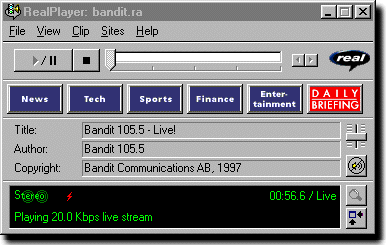
The preceding example played a fixed soundclip. A more powerful application is the transmission of "live" sound. As an example, let us illustrate the use of "on demand" radio by connecting to the live audio stream for a Swedish rock radio station, FM 105.5 "Bandit Radio" (we can't do education ALL the time!).
Use the browser to access the real guide. Select the "all stations" link. on the resulting page, select "STATIONS", and on the resulting page type into the search field "bandit 105.5" followed by a return. On the resulting page click on the link "Bandit 105.5 Rock". This will bring up a page written in Swedish. Wait a few seconds, or click the link near the top to forward you to a new address. Click the top right "Play" button. This should bring up a window similar to the following