

Sound Files | Creating Sound Files


Creating Sound Files
Most newer personal computers (and many newer workstations) come out of the box with simple hardware and software for using a microphone to record your voice and other sounds. The sound quality of files created in this manner will not be very good, but this equipment does provide a means for you to create files with personally customized messages that you can include on your Web pages.
Digitally recording and storing sounds of professional quality still requires equipment that is expensive and out of reach of today's average Web page creator. No doubt this situation will improve in the near future.
Creating a Sound File with Windows
You can make sound recordings on your PC if it has a microphone
and the program Sound Recorder.
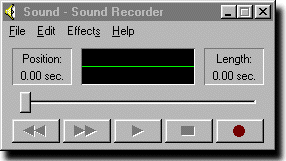
The resulting file is in WAV format.
 button to start recording.
 button when you are finished.
Linking to Your Sound File
The sound file that you have just produced can be played
from a browser link like
<a href="file.wav">Sound File</a> |
Streaming Sound
A more efficient way to transmit sound on the web is to stream it, which means that the sound plays as it is being loaded, rather than waiting for the full file to download. In the next section we discuss one way of playing streaming sound. Also, the program Flash discussed later has the capability to create streaming sound files.