

Newsgroups | Newsreaders


Newsreaders
A computer interface that allows one to read and post newsgroups
items, and to manage these items in some systematic way, is termed a
newsreader. There are various newsreader programs available, but
these days Web Browsers generally come equipped with their own integrated
newsreaders. For our tutorial, we will use screen shot illustrations
from the newsreader that comes packaged
with Netscape 3.0. The corresponding newsreader for
Internet Explorer is very similar.
Starting the Newsreader
In your browser window, pull down the "Window" menu and select
"Netscape News".
Your computer should then pop up a new display window that
looks something like the one shown below. You will notice many similarities
with the Mail
interface, and the main browser window that we
have encountered before; this is one of the advantages of using an integrated
browser package supporting additional functions like mail and newsreading.
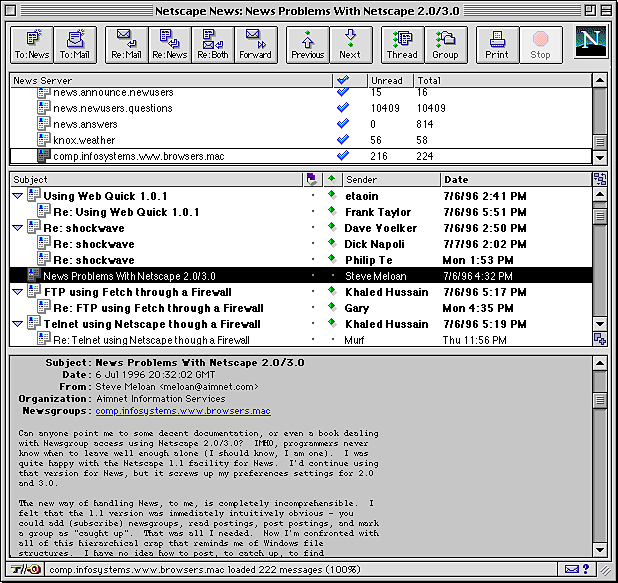
Actually, it may not look exactly
like this window, since you can configure the browser
to display the reader in different formats. The format shown here corresponds
to a choice that can be set in the "Preferences" of Netscape
3.0
by going to the "Options"
pulldown window at the top of the newsbrowser, selecting
"Mail and News Preferences", and then in the resulting window checking
"stacked" under "News Pane Configuration". If your browser is displaying in a
different format, all the parts we are about to discuss will be there, but
arranged differently from the picture above.
The Parts of the News Window
The News Window may be divided into 4 basic parts (which are stacked one on top
of the other in the format shown above):
In the example shown, 5 newsgroups are displayed in the newsgroup list:
The newsgroup comp.infosystems.www.browsers.mac has been selected
by clicking with the mouse button, as indicated by the box surrounding this
entry, and that its icon is darkened. From the list of posted messages from
this newsgroup in the next panel down a posting entitled "News Problems with
Netscape 2.0/3.0",
posted by a user named Steve Meloan on July 6, 1996, at 4:32
PM has been selected, and the text of that message appears in the bottom panel.
Subscribing and Posting
That's about it as far as reading newsgroup messages are
concerned. The layout of your newsreader may be a little different, but the functions will probably be the same. However, there are a few more things that we need to learn
if we are going to use Newsgroups to their full advantage:
- How do you know which newsgroups are available?
- How to you "subscribe" (and "unsubscribe") to particular newsgroups?
- How do you post your own messages to newsgroups?