

Finding Things | Search Engines


Search Engines
A search engine is a program that looks through
databases of information
that have been
compiled about Web pages and reports back any items it finds that
match the keywords you specified.
Example: the AltaVista Search Engine
An example of a search engine is the AltaVista Search Service
provided by Compaq. This is a Web page that
includes a small window in which you can type a word or set of
words you might think would be found in Web documents that deal
with a topic you are interested in.
For instance, suppose you wanted to locate information about baseball on the WWW. You could go to the AltaVista site and enter that word so that the entry field on the page would look like:

You then press "Return" or "Enter", or use the mouse to select the "Submit" button. The search engine will respond by providing you with a list of all the documents in its database that contain the word "baseball". Your browser will display a page with your keyword(s) and a list of documents in which the engine found the word(s). For a search on "baseball", the top of the page the engine gives you might look like (click on the image for a larger version):
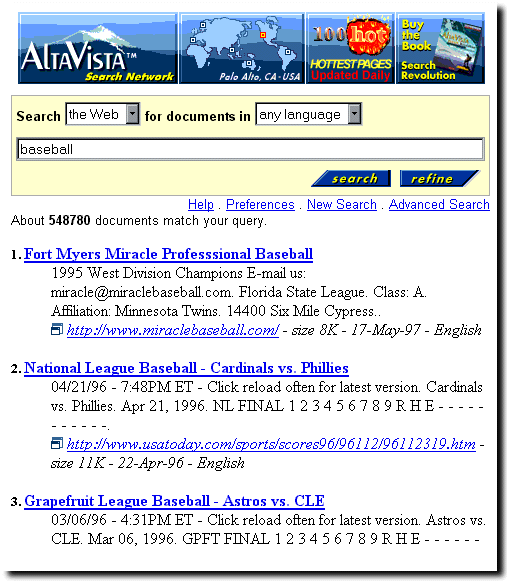
(We display only the first few matches.) Note that each match (or "hit") returned by AltaVista for the keyword(s) you provided has a link to a document that contains the keyword(s). The link appears in two places: 1) the link at the beginning of the hit tells you the title that the document's author gave it and 2) the link at the end of the hit shows you the URL for the document. You can go to the document by simply clicking on either of these links. (But don't try to go to the document by clicking the underined words above. Remember this is just a "photo" of the page the engine returned, not the actual page itself.)
Sharpening the Focus
If the keyword you specify for the search is a rather common
term, you may be presented with an enormous number of Web documents that
contain the term.
(Note the number of documents that AltaVista found in this example
that contain the word "baseball" - 548,780.)
In this case many of the hits
may only accidentally contain the term you told the search engine to
find. Rather than wasting a lot of your time looking through the long
list and visiting links that may turn out to have little or nothing
to do with the topic you are really interested in, you can let
the search engine do the sifting by repeating your search with additional
and more specific keywords.
For example, maybe you are really only interested in information on
the Atlanta Braves. In that case, rather than telling the search engine
to look for "baseball" and then doing all the work yourself to narrow
this to a list of only those documents about the Braves, simply have
the search engine perform a new search: erase the previous contents of
the entry area and type "atlanta braves".
Use Quotation Marks to Group Words
Be sure to include the quotes
when you type this if you want the two words to be considered a single
term. If you omit the quotes the search engine will report on any
documents it finds that contains either of the words "atlanta" or "braves".
For instance, if you omit the quotes, the engine may show you a list that
contains links to all sorts of documents about Atlanta that have nothing
to do with its baseball team, or plenty of documents that contain the
word "braves" but have nothing to do with Atlanta baseball.
Case Sensitivity in Searches
If you use only lowercase letters for your keywords,
the AltaVista
engine will give you a list of all documents that contain the
words, regardless of the case in which the words appear in the
documents (i.e., the engine performs a "case insensitive" search).
On the other hand, if you use any uppercase letters in a keyword,
the engine will only report hits for the documents that contain
an exact match for the word in that exact set of upper and lower
case letters. For instance, if you give "atLaNta" as a keyword, you
will only find those documents (if any exist) that contain the word
written exactly that way; you wouldn't find those that contained
"atlanta" or "Atlanta".
And Maybe Sharpen Some More
Specifying "atlanta braves" for a search will still return a lot of
hits, probably far more than you wish to search through by yourself
to find the information you're really seeking, so you would probably want to be
even more specific. For example, try the search engine with the keyword string
"atlanta braves" schedule. This will search for Web documents in
which the phrase "atlanta braves" occurs and the word "schedule"
occurs (with no case sensitivity). You should find that the first few hits
now correspond to much more specific information about the playing schedule of
the team.
Use the Help Files to Perfect your Search Techniques
Search engines usually have help pages to show you how to
target your
search so that their returns are more likely to be relevant
to the information that you seek.
The AltaVista search engine
that we are using as an example has a whole set of
help pages to help improve your search skills.
As an example, we learn from such help pages that one can require a document to contain certain words, but to not contain certain others. How could that be useful? Well, suppose we wished to find a schedule of Atlanta Braves games from previous years, not the present year of 1996. (Maybe you are a detective, trying to see if an Atlanta player could have been in town and committed a string of similar crimes that occurred on certain dates in previous years; well it could happen!)
If you just search on "atlanta braves" schedule, it is likely that the hits will be dominated by documents associated with the schedule for the present year, and you will have to search through many superfluous documents looking for those that may contain the information that you seek. Try instead repeating the previous search with the search string "atlanta braves" schedule -1996:

Other Search Engines
There are many search engines besides the AltaVista service
available on the Web.
Here are links for some:
All-in-One
and
Search Thingy.
Although there may be minor differences
in the details of their use, most
of these engines behave in a similar way,
accepting a list of keywords from you and giving in return a list of documents
that contain those keywords.
Most also provide help that you can consult if using a procedure
like that described above does not produce the sort of results
you had expected.
Natural Language Searches
The search engines are now quite good at interpreting "natural language" phrases (that is, the way you would ask another person a question). For example, try typing "recipe for shrimp gumbo" into the search window. Thisis one of the first things to try when you are looking for things.
Internet Safety
Search engines can access a broad range of material on the Web, depending on
search strings used. Thus, unsupervised use of search engines by students can
lead to access of inappropriate material. It is advisable to
consider this if you intend to use search engines directly in your classes
(as opposed to using them to find material that you intend to
use later in class).
You may find it useful to warn your students that it is possible to go back and find out from the computer which files and addresses have been accessed by the Web browser on that computer (by looking at what are called the cache files - see the detailed instructions for the use of your browser). You should also consult the discussion of netiquette and the section on Internet Safety.