

Telnet | Microsoft Telnet


Microsoft Telnet
The program that we are going to use to implement telnet is Microsoft Telnet v1.0,, which is included as part of the Windows 95 distribution. If you are using Windows 3.x, there are numerous shareware telnet clients available for that operating system. You can check some of the possibilities with your favorite search engine.
Initiating a Telnet Session
When you launch Microsoft Telnet, a terminal window is
opened. This is where you will be able, once connected, to type commands
directly to a remote computer.
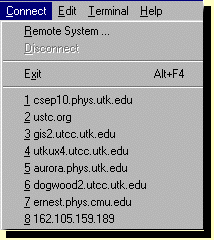
Move your mouse to the top of the window to display the
"Connect" pulldown menu; it should look similar to the figure at the right.
Drag down to highlight "Remote System", and release. The resulting popup
"Connect" login screen looks like the figure below.
You may make a connection by typing into the "Host Name" window of this popup the telnet address to which you wish to connect and clicking the "Connect" button at the bottom of this window. In the example shown, the address is locis.loc.gov.
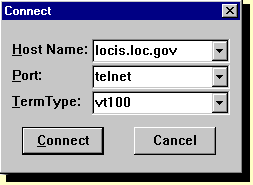
Try typing this address into the login window for Microsoft
Telnet and see what happens. You may exit from the resulting telnet
session by choosing "Disconnect" from the Telnet "Connect" menu.
This is an example of a telnet
login that does not require a password, because
it has been set up to allow "Anonymous Logins"; that is, it
permits logins from people who
do not have accounts on the computer with the IP address
locis.loc.gov
Other Microsoft Telnet 1.0 Features
Addresses for recent connections
are stored at the bottom of the "Connect" pulldown menu, as seen in the
first figure in this section.
If you wish to go to one of these addresses,
simply drag your mouse down to highlight the desired address
and release.
Another feature worthy of note is that you can have more than one MS Telnet 1.0 window open at the same time, so that you can have multiple concurrent login sessions on the same or different remote computers.
At one time telnet was a very important means of obtaining information on the Web. This function has almost entirely been taken over by Web browsers now. It is still important, however, as a way to log into remote machines, particularly those running Unix operating systems. If you have an account on such a system, you can use telnet to log into your account from any machine supporting telnet on the internet.
