

Teleconferencing | NASA TV


NASA TV
As an example of a useful application of Public CU-SeeMe access, let us look at
receiving
NASA TV
directly over the
Internet. This is of particular interest when live events such as Space
Shuttle Missions are being transmitted, but there are often televideo
presentations of educational interest even when this is not the case.
In this application one typically uses
CU-SeeMe in a receive-only mode
by connecting to a reflector site.
Example 1: NASA TV
If you stored the master list of nicknames, as
described in the previous section,
double click its icon to open the file and look through it to find
one of the "(USA) NASA TV at ..." options (there are several).
Go to the "Conference" pulldown
menu, select "Phone Book", and click the "New" button.
Enter the name for the site you chose and click "OK".
Then enter the IP number shown for this site in the master list
in the "IP Address or Hostname" box and click "Save".
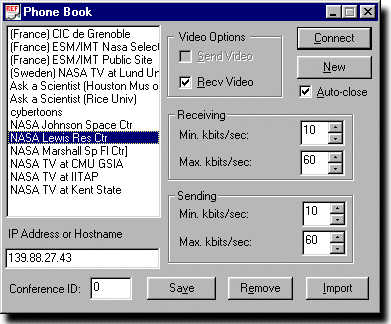
If you do not have this master list file, try accessing the NASA site at NASA Lewis Research Center. Open the Phone Book window (as above) and click "New". Enter "NASA Lewis Res Ctr" and click "OK". Then enter 139.88.27.43 in the "IP Address or Hostname" box and Click "Save".
In either case, be certain
that "Recv Video" is checked, but "Send Video" is NOT checked,
and click "Connect" (see adjacent figure).
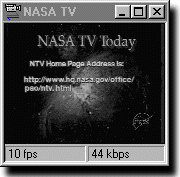 A window similar to the one shown on the left should pop up
with NASA programming in it. If it does not,
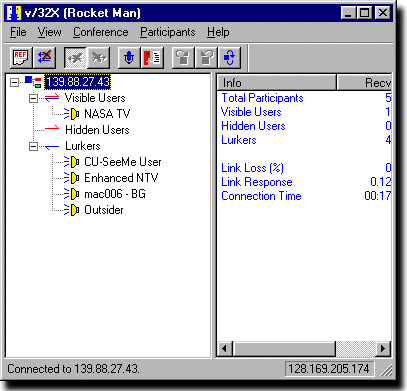
go to the participants list in the main CU-SeeMe window and look
for an entry "NASA TV" under "Visible Users"; see figure below.
(You may need to first click on the box next to this category title, if the
list is collapsed.)
Selecting that entry will open the window.
This participants list also shows those presently logged into NASA
TV through this server, with their status.
We showed an example of such a list
in the earlier general discussion of CU-SeeMe.
A window similar to the one shown on the left should pop up
with NASA programming in it. If it does not,
go to the participants list in the main CU-SeeMe window and look
for an entry "NASA TV" under "Visible Users"; see figure below.
(You may need to first click on the box next to this category title, if the
list is collapsed.)
Selecting that entry will open the window.
This participants list also shows those presently logged into NASA
TV through this server, with their status.
We showed an example of such a list
in the earlier general discussion of CU-SeeMe.
Example 2: Ask a Scientist
Another application of CU-SeeMe that may be
of interest for classroom application
is the
Ask the Scientist
CU-SeeMe televideo conference program, with reflector at
128.42.249.172. A
schedule of events is available during the school year, and you may subscribe to a
mail list.
Reflector Responses
Reflectors are not always on, or may transmit an initial "message of the day"
still image when they are on. Two typical responses, one giving a
"message of the day" timeschedule
and one indicating that the reflector is not operating
(or at least not accepting connections) are shown in the following figures.
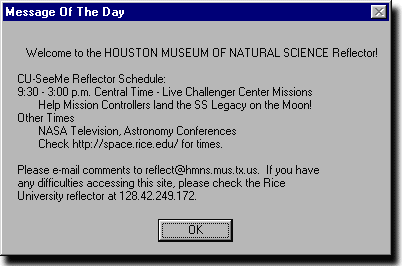
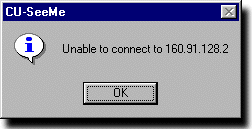 If you get a response like the first one (a connection, but no video window)
look at the participants list in the main CU-SeeMe window.
There will normally
be a window listed
there that will display when it is selected explicitly. For example, see the
"NASA TV" entry in the participants list of the main window
shown above in an example. Of
course, if you get a response like the second one, you are out of luck for the
moment since the relector is not receiving connections.
If you get a response like the first one (a connection, but no video window)
look at the participants list in the main CU-SeeMe window.
There will normally
be a window listed
there that will display when it is selected explicitly. For example, see the
"NASA TV" entry in the participants list of the main window
shown above in an example. Of
course, if you get a response like the second one, you are out of luck for the
moment since the relector is not receiving connections.