

HTML | Background Colors


Background Colors
We've now learned a variety of ways to find resources on the Web.
Let's use some of these Web resources to help us modify your homepage into
something that looks a bit snazzier.
The "Body" HTML Tag
If you open your
homepage file with the editor you will find near the top an HTML "body tag"
that has the following form
<BODY BGCOLOR="#000030" TEXT="#ff0000" LINK="#00ffff" VLINK="#00ffff" ALINK="#FF0000"> |
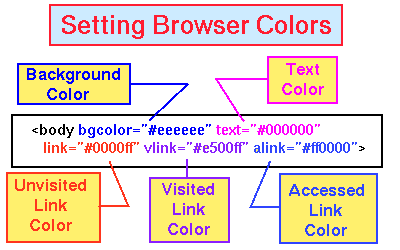
Such tags control the colors for the text when a Web Browser displays your page, according to the identifications in the following diagram (note that in HTML the tags are generally not case sensitive; e.g., "BODY" and "body" are equivalent).
Hex Numbers and Color
Well, # indicates that this is a color, and
in a
discussion of colors
we will learn that
the next six characters (ff0000)
are in the form xxyyzz,
where xx is the amount of red, yy is
the amount of green, and zz is the amount of blue mixed to form the
text color, with each of these pairs (e.g., ff) a number in the
base-16 or hexadecimal number system---the "hex system", to those in
the know.
Whew! I'm sure you are looking forward to learning about that! If humans had 16 fingers and 16 toes instead of 10 each we probably would know the base-16 system by heart, but it is unlikely that many of you use hexadecimal numbers on a regular basis. Is there a way to bypass studying the base-16 number system, at least for now? After all, we just want to change some colors on our homepage!
You should
learn something about the base-16 system because it is so
common in computers and because it is fun,
but we will save that for later. For now we are going to
illustrate that we can learn how to change colors on our homepages without
learning how to do base-16 numbers in our head. We shall
do so
by using resources that are
available on the Web. That is, we are going to set our newly-won
"Finding Things" expertise to a useful and noble task: the avoidance of work
in the process of accomplishing something useful!
Color Resources on the Web
Your assignment is to modify the colors on your default homepage to something
more to your liking (red on navy isn't everyone's cup of tea). What would
greatly simplify that is to have a table of colors with the associated hex code
for the color. Then we could find some colors that we liked from the table and
just copy the corresponding hex code into the body tag in our homepage. Even
better, in the best of worlds we might hope for a computer program that would
allow us to click on a continuous dispay of colors to select them, and once
they were selected, to display a sample page with those colors to see how they
actually look in a browser display.
Surprise! Precisely such resources are out there on the Net. We could use techniques like search engines to find them, but in this case it's even simpler: some sites that do these things are contained in one of the resource compilations we have already looked at. Using your second browser window, go to this resource compilation and select the "Web and Networking Tools" link (under the heading "Computer Stuff"). From the resulting menu, select the link "Graphics for the Web".
The resulting page has many links. Find some there that help you select colors for the browser. For example, a good one to start with is labeled "Background Colors (Table of Examples)". Figure out how these things work, and use them to select some new colors to customize your homepage by changing the colors in the "body" tag.