

Advanced Methods | Frames


Frames
Now let's look at frames and frame sets, how they are created and how they can be used. webTeacher uses frames to organize and present its contents, so it may seem a bit strange that we haven't considered this topic before now. But there's really a good reason for that. Although we'll go into considerable detail in our discussion of frames, you should realize that it's very easy to use them. Frames are really just a way of "subdividing your real estate". They allow you to break a browser window into a number of rectangular subwindows. You get to decide how this subdivision will organized and occupied.
Once your subdivision is laid out, you can load HTML pages, images, or web sites into the separate frames. Thus, you can take any or all of what you've already learned about creating web pages and apply it to each of the frames in your frame set. The contents of the separate frames can be completely independent of each other, or you can establish communications links between the frames.
When you create a new frame set, you also get to determine whether or not the overall frame set is resizable, and whether or not the various frames of the set are scrollable and/or resizable. Thus, you get to decide whether or not a user can "reconfigure" the frame set that you've built and furnished after she has downloaded the frame set to her browser.
webTeacher Uses Frames!
Yes, webTeacher uses frames.
In the figure below "Frame 1" labels the main display area of webTeacher;
"Frame 2" labels a clickable table of contents. When one of the entries
in Frame 2 is clicked, the corresponding page loads into Frame 1.
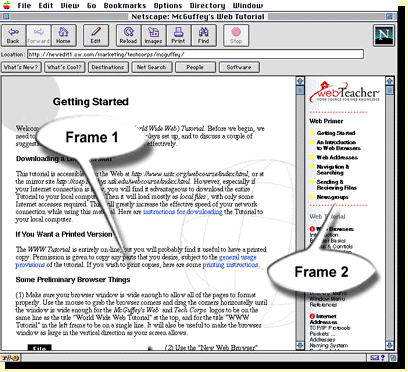
This use of frames permits the continued display of some material as one
moves through a site. The above sort of arrangement is, in fact, one of the most
common uses of frames on the web.
In a moment, we'll see how these two frames are created.
We'll also look at more complex varieties of frame sets and learn how to cause links in
one frame to display pages in another frame.
Some Other Web Pages that Use Frames
Here are a few other examples of web pages and sites that use frames:
- El Nino and the Southern Oscillation
- Biomechanics World Wide
- TECH CORPS news page (experimental version)