

Electronic Mail | Mailto Links


Mailto Links
There is an extremely simple way to incorporate sending electronic mail into a Web document. One merely has to insert a "mailto" link, which has the general form
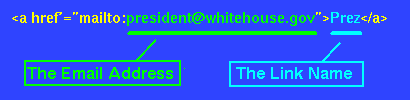
where the portion shown in yellow is always the same in any such link, the portion shown in green is the email address to which the message is to be sent ([email protected] in this case), and the portion shown in light blue is the link name that will appear on the browser page (Prez in this case). The link name is completely up to you to choose, but the email address obviously must be the exact email address of the person to whom you wish to send email.
Thus, the mailto command in the preceding figure produces the following link when incorporated into an HTML document:
Adding Mail Links to HTML Files
It looks like mailto links could be VERY useful, doesn't it? Since it is likely
that you will often have important advice to send to the President, why don't
you put a mailto link to the President (and the Vice-President while we're at
it)
in your homepage? That is very easy to
do:
Open your homepage file with an editor and insert (exactly as written) the following HTML code:
<h3> Some Mail Links: </h3> <a href="mailto:[email protected]"> Prez</a> <p> <a href="mailto:[email protected]"> V-P</a> |
You can do this by copying the text directly off the browser screen with the mouse and pasting it into your homepage file, or you can (carefully) type the lines into the file. The lines may be placed anywhere in the file after the <body> command and before the </body> command.
Now save the file and use your second browser window to open your homepage. (You may have to do a "Reload" to get the browser to see the modified file.) If things have been done properly, you should get something like the following as part of your homepage display:
|
Some Mail Links:
|
and if you click on these links they should allow us to send email to the
corresponding addresses.
Now Customize Your Homepage With Mail Links
That's pretty easy, huh? Now use these two mailto links as templates to
customize your homepage by adding some links for other
people that you may want to
email frequently. You can either change these two examples to
other addresses, or you can just add more mailto links to these.
In this HTML code the <h3> Some Mail Links: </h3> command just defines a heading of a particular size ("level 3"; there are 6 levels of headings, with level 1 having the largest font and level 6 the smallest, and <p> is just a command to insert a paragraph (i.e., to skip a line). The rest corresponds to mailto links, which you now know all about!