

Sound Files | Realtime Audio


Audio Players
As noted earlier, sound files of even short time duration and fairly middling quality can be quite large and take a while to download at most common connection speeds. As the duration increases and/or the quality improves, the file size grows quickly. Of course, the file size and long download time problems are even greater with video. Consequently, the ability to stream audio and video can often be vital to making the use of these media on the web practical.
One popular means of accessing streaming media on the web is with
RealPlayer, freeware available
for PowerMacs, Windows, and Unix systems from RealNetworks.
(You can also obtain a commercial version of the program that has additional features from the same
site.)
RealPlayer plays both streaming
audio and video, and it can function either
as an independent application to access real time audio on the net (for example, many radio
stations), or
as a plug-in application that is launched automatically by the Web browser
when you connect to a site transmitting a real time audio stream.
(A properly configured browser will know to use RealPlayer because the streaming file will be in a special format, not one of the ones we discussed previously.)
Some Caveats
The transmission of high quality real time audio on the network generally
requires at least 28.8 kbaud modem connectivity. You can still connect
at slower speeds, but the sound quality will be diminished. Over ISDN
and faster connections the sound quality can be quite high from sites
offering a 28.8 kbaud stereo audio stream if you have stereo speakers
on your computer.
RealPlayer's Realguide
A starting point for exploring audio/video sites on the Internet is the realguide. From this site, you can find a variety of News, Industry, Business, and on-line radio broadcasts of all types, as well as special events. The site can be accessed from the link just given, and it can also be accessed directly from RealPlayer itself, as shown in the figure below.
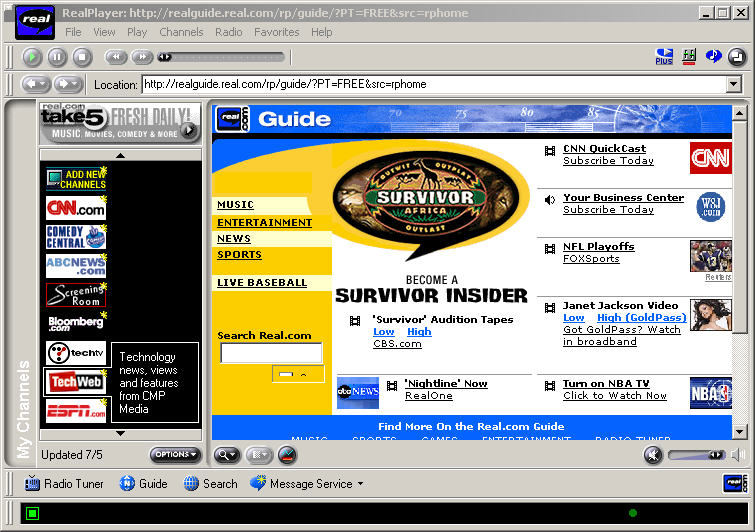
Assuming that RealPlayer has been installed and configured to launch automatically from your browser, you can explore a variety of sites simply by clicking and following the instructions. Check out this gallery to search for audio and video of special events from NASA's space missions.