|
|
The View Menu
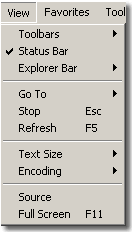
The "View" pulldown menu has the entries shown in the following figure for the Windows version of Explorer 5.0.
-
Toolbars: Allows you to display different toolbars (i.e., different rows of buttons located at the top of the browser window) such as the "Back" and "Forward" row and the Address window.
A check indicates that the feature is selected. Selecting with the mouse toggles the check on and off.
-
Status Bar: The status bar area is at the bottom of the browser. It toggles on and off also.
-
Explorer Bar: Allows you to add another frame to your browser window, which lists either folders on your machine, or your favorite web sites, or a history of web sites you have recently visited.
- Go To: Allows you to go back to the previously displayed URL,
other URLs you have visited, or your original home page.
-
Stop: Stops the loading of a page.
-
Refresh: Refreshes the current page.
-
Text Size: Allows you to change the size of the text in your browser window
(provided this is allowed by the coding for the displayed page).
-
Encoding: Allows you to select a different language for your browser.
-
Source: Display the HTML source for the present document.
-
Full-Screen: Displays the browser to expand over the entire screen of your computer.
|
|


