

Newsgroups | Posting to Newsgroups


Posting to Newsgroups
Posting messages and replies to newsgroups is not difficult, since the process
is very similar to sending email, which we already have learned how to do. In
fact, posting to a newsgroup essentially IS sending email, just to a large
readership!
Posting, Mailing, or Both?
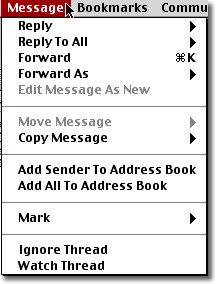 To reply to a previously posted newsgroup item in Netscape 4.7, select
the item to display it and then select the "Message" pulldown menu (see
figure at right). In that pulldown menu there are four choices relevant
for posting:
To reply to a previously posted newsgroup item in Netscape 4.7, select
the item to display it and then select the "Message" pulldown menu (see
figure at right). In that pulldown menu there are four choices relevant
for posting:
-
"Reply", with the submenus:
- to Sender Only
- to Newsgroup
-
"Reply to All", with the submenus:
- to Sender and All Recipients
- to Sender and Newsgroup
At the risk of belaboring the obvious, the functions of these four options are as follows. "Reply - to Sender Only" sends only an email to the person who posted the message to which you are replying. "Reply - to Newsgroup" posts your reply to the newsgroup but does not send a separate message to the original poster. "Reply to All - to Sender and All Recipients" sends separate messages to the original poster and any other individuals he/she may have emailed the message to. "Reply to All - to Sender and Newsgroup" sends an email to the person who posted the message and posts your reply to the newsgroup.
Which of these choices is appropriate depends on the nature of any original
message that you may be replying to, and whether the response you are
posting is of general interest to the newsgroup, or of interest only to
the individual that you may be replying to.
Posting a Message
Choosing any of the four options mentioned above gives a dialog box like the
one shown in the figure
shown below (which is rather similar
to the email dialogue box that you'd see if you used Netscape to compose and
send mail messages).
If you are not replying to an existing posting but are submitting an original message for posting, you can click the "New Msg" button in the main newsreader window to bring up a dialog box almost exactly like the one shown below. (The only difference is that if you are replying to an existing message the subject line of the dialog box will already be filled in to refer to the subject of the message that you are replying to, while if you are posting a new message the subject line of the dialog box will be empty.)
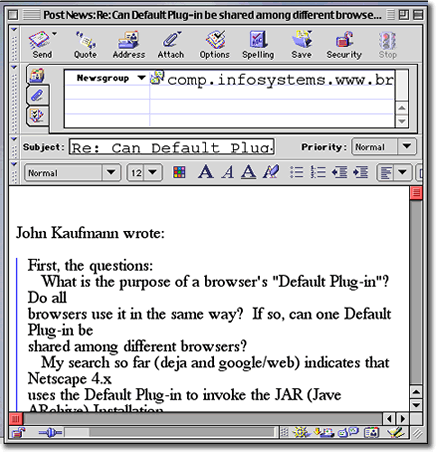
Type your message into the bottom box of this dialog. It is usually good form to copy at least the relevant parts of any message to which you are replying by clicking the "Quote" button. This will insert the message you were displaying when opening this dialog box. In Netscape 4.7 the quoted text is indicated by a blue vertical line at the left of the display to distinguish the original message from your response. (Note: your browser may be configured to quote the original by default; if so, the quoted message will already be in the box when it comes up.)
When you are finished filling in this dialog box, you are ready to post your message, which you can do by simply clicking the "Send" button at the top left of the dialog box. However, if you are new to newsgroups, we suggest that you read the next section of "netiquette" before posting any messages.