
Newsgroups | Newsreaders


Newsreaders
A computer interface that allows one to read and post newsgroups
items, and to manage these items in some systematic way, is termed a
newsreader. There are various newsreader programs available, but
these days Web Browsers generally come equipped with their own integrated
newsreaders. For our tutorial, we will use the newsreader that comes packaged
with Netscape Communicator 4.7.
The interface with your browser, or your dedicated newsreader, will probably be similar.
Starting the Newsreader
In your Netscape browser window, pull down the "Communicator" menu and select
"Newsgroups".
(In older browser versions like Netscape 3.0 the newsreader may
be under a different menu; check the help file if you can't find it quickly.)
Your computer should then pop up a new display window.
Once you have selected a newsgroup and a message in the group (we'll explain how to
do these things),
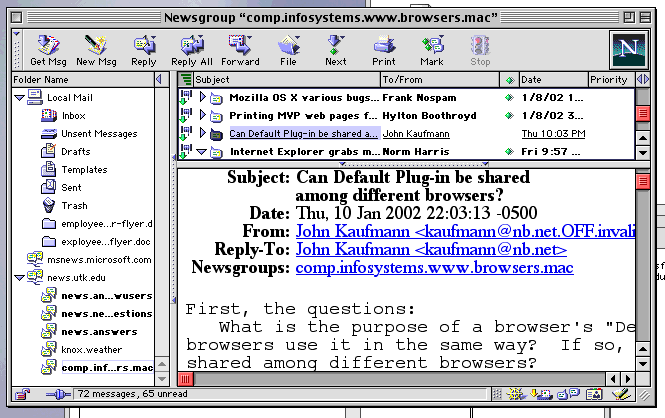
the window should look something like the one shown below.
Actually, it may not look exactly
like this window, since you can configure the browser
to display the reader in different formats. If your browser is displaying in a
different format, all the parts we are about to discuss will still be accessible, but
may not be immediately visible.
The Parts of the News Window
The News Window may be divided into 4 basic parts (which in the figure above are
arranged as described below):
- The control buttons at the top.
- The Folder Name panel at left, which allows quick access to your email folders (if you have configured your browser to handle email), configured news servers, and subscribed newsgroups.
- The list of posted items in the top right panel, if a particular newsgroup has been selected from the list of newsgroups in the Folder Name panel.
- The text of a news item in the bottom right panel, if one has been selected from the list of posted items.
In the example shown, 5 newsgroups are displayed in the
newsgroup list for
the news server news.utk.edu:
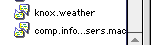 If the Folder Name panel isn't wide enough to display an entire newsgroup
name (as in the example at right), you can widen the panel
by dragging its border to the right.
Or, if you simply mouse over the newsgroup name,
a window will pop up to show the full name of the group, the total number
of messages in the group, and the number of those messages that you haven't read
as shown below.
If the Folder Name panel isn't wide enough to display an entire newsgroup
name (as in the example at right), you can widen the panel
by dragging its border to the right.
Or, if you simply mouse over the newsgroup name,
a window will pop up to show the full name of the group, the total number
of messages in the group, and the number of those messages that you haven't read
as shown below.

In the example shown in the first figure above, the newsgroup comp.infosystems.www.browsers.mac has been selected, as indicated by the box surrounding this entry in the Folder Name panel. Note that the group's name now appears in the title bar of the newsreader.
From the list of messages posted to this newsgroup in the top right
panel a message entitled
"Can Default Plug-ins be shared among different browsers?"
has been selected.
This message was posted to the newsgroup by a user named
John Kaufmann on January 10, 2002 at 10:03 PM.
The text of that message appears in the bottom right panel.
Subscribing and Posting
That's about it as far as reading newsgroup messages are
concerned. The layout of your newsreader maybe a little different, but the functions will probably be the same. However, there are a few more things that we need to learn
if we are going to use Newsgroups to their full advantage:
- How do you know which newsgroups are available?
- How to you "subscribe" (and "unsubscribe") to particular newsgroups?
- How do you post your own messages to newsgroups?
The next sections will deal with these topics. As part of that, we will also say a few words about "net etiquette" or "netiquette": what is acceptable and what is not in postings to newsgroups (particularly unmoderated ones).