

Web Browsers | The Options Menu


The Options Menu
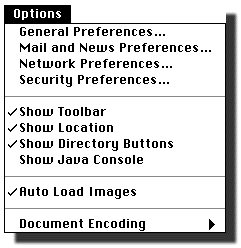
The "Options" pulldown menu has the entries shown in the following figure for the Macintosh version of Netscape 3.0.
-
General Preferences: Brings up the windows allowing general
preferences for the browser to be set.
-
Mail
and
News
Preferences: Brings up the windows allowing
preferences for the mail interface and newsreader interface to be set.
-
Network Preferences: Brings up the windows allowing
preferences for the network to be set.
-
Security Preferences: Allows security preferences to be set for the
browser.
-
Show Toolbar, Show Location, Show Directory Buttons: Toggles that
choose whether these objects are displayed at the top of the browser. A check
indicates that they are selected. Selecting with the mouse toggles the check
on and off.
-
Show Java Console: Toggle that chooses whether this is displayed
(in a window by itself). A check indicates that it is selected.
Selecting with mouse toggles the check on and off. The Java console displays
information and error messages associated with any Java programs that your
browser runs.
-
Auto Load Images: If checked, images are loaded automatically. If
unchecked, in-line images are not loaded until their icons are clicked in the
displayed document. Selecting with the mouse toggles between on and off.
- Document Encoding: Selects language encoding for document.