The File Menu
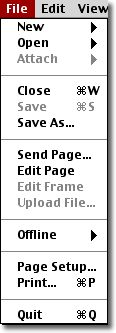
The "File" pulldown menu has the entries shown in the following figure
for the Macintosh version of Netscape 4.7.
-
New: Opens a new browser window, leaving any
windows already open intact, or opens the email message composition window (depending on
the user's choice from a submenu; see below).
-
Open:
Opens a local file (on your computer) or a web URL in either a browser
window or in Netscape Composer (Netscape's graphical tool for creating
web pages).
Which option is executed depends on a choice from a submenu (see below).
-
Close:
Closes the selected browser window but does exit from the Netscape program.
-
Save As:
Saves a copy of the current document to a file on your computer.
-
Send Page:
Opens the Netscape message composition window so you can email a copy of the
page to someone. The page title is the default subject,
and the page will appear in the body of the message.
-
Edit Page:
Opens the current page for editing in Composer.
-
Offline:
Either work offline or synchronize your local copy of a file with the current
version on the web.
-
Page Setup: Sets up the printer for output.
-
Print: Prints the displayed page.
-
Quit: Closes all windows and quits the browser.
The File > New Submenu
The adjacent figure shows the submenu that appears if you select (click on) the New
option of the File menu.
These are the results of choosing the various options from this submenu:
-
Navigator:
Opens a new browser window (which initially displays your
home page), and keeps already open windows intact.
-
Message:
Opens the email message composition window so you
can create and send an email message.
-
Blank Page
Opens a new browser window and displays a completely blank page (rather than your home page).
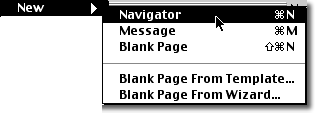
The last two items in the New submenu (below the horizontal line)
take you to a Netscape web site. If you register there, you can
create your own web pages at the site. The site offers templates
and a "wizard" (a step-by-step help program) to aid you in getting
started in the creation of these pages.
The File > Open Submenu
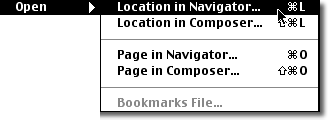
The adjacent figure shows the submenu that appears if you select Open
in the File menu.
These are the results of choosing the various options from this submenu:
-
Location in Navigator:
Prompts for a URL. The document at this location will be loaded into
the current browser window (if one is already open).
-
Location in Composer:
Prompts for a URL. The document at this location will be loaded into
Netscape Composer for editing.
-
Page in Navigator:
Opens a local file (i.e., a file on your computer) in
the current browser window (if one is already open).
-
Page in Composer:
Opens a local file in Netscape Composer for editing.
|


