

Web Browsers | The Edit Menu


The Edit Menu
The "Edit" pulldown menu has the entries shown in the following figure for the Macintosh version of Netscape 4.7. Some of the most important options are described below.
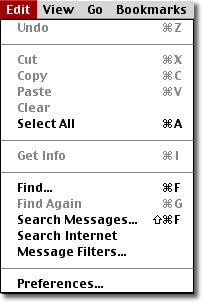
Probably one of the most important items in this menu is "Preferences". Selecting this item opens a window with many options. Some of the most important of these let you set your homepage URL (the page you go to when you click the browser's "Home" button) , determine the helper applications used to diplay files that the browser cannot display itself, configure the browser to read and send email and to access newsgroups, delete cached files (previously downloaded files that are temporarily stored on your computer), and make various security settings that determine the amount of access that is available to your computer by programs downloaded from the web.