

Electronic Mail | Mailto Links


Mailto Links
There is an extremely simple way to incorporate sending electronic mail into a Web document. One merely has to insert a "mailto" link, which has the general form
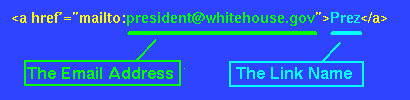
where the portion shown in yellow is always the same in any such link, the portion shown in green is the email address to which the message is to be sent ([email protected] in this case), and the portion shown in light blue is the link name that will appear on the browser page (Prez in this case). The link name is completely up to you to choose, but the email address obviously must be the exact address of the person to whom you wish to send email.
Thus, the mailto command in the preceding figure produces the following link when incorporated into an HTML document:
Try clicking on this link and seeing what happens. If your browser is properly configured to send email, this should pop up a mailing window with the address of the President already entered. (Note that the prevalence and convenience of mailto links is a good argument for configuring your browser for email even if you primarily use web mail and rarely or never read mail with your browser's email interface.)
You may either send the
President a message, if you have something important to tell him, or you can
kill the mail window so that no message is sent by clicking the
close button in the
upper right hand corner.
Homepage Exercise
It looks like mailto links could be VERY useful, doesn't it?
If you wish, you can use this
exercise
to add a couple of mailto links to your homepage.