

Electronic Mail | Receiving Electronic Mail


Receiving Electronic Mail
After logging in to your web email site, look for a button or a link that indicates
the location of any
mail you may receive. The link may be something like "Inbox" or
"Check Mail." Click on the link and a list indicating all your new messages
and your remaining old messages (ones you haven't deleted) will appear.
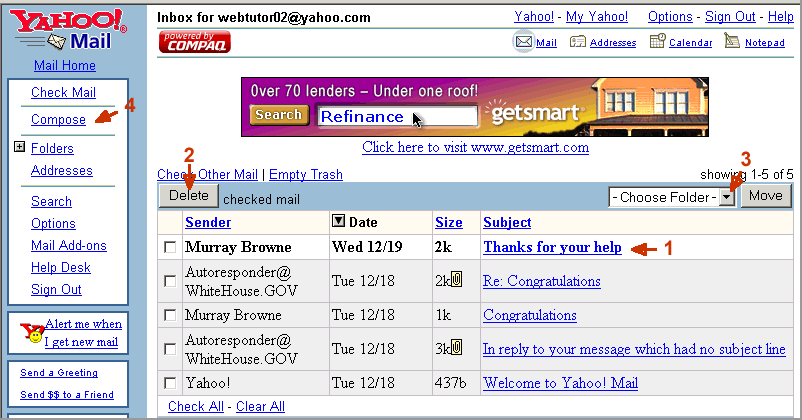
On Yahoo, the message subjects will be listed; each will be a link to the corresponding message.
Handling Mail
At this point you have several options. (The numbers in the following list correspond to the numbered items in the figure.)
Reading and Replying to Mail
Once you've brought up a message to read, you have several options in handling it:
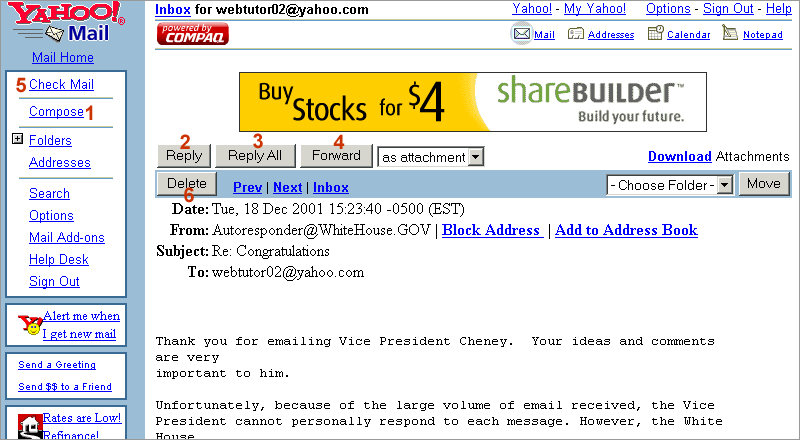
The control buttons allow us to initiate most basic mailing operations just by clicking with the mouse. If some of the commands seem unclear to you, check Help for the site (the link at the top right of the above figure for the site we've shown) for further information.