Web Browsers | The File Menu
Next

The File Menu

The "File" pulldown menu has the entries shown in the following figure for the Windows version of Explorer 5.0.
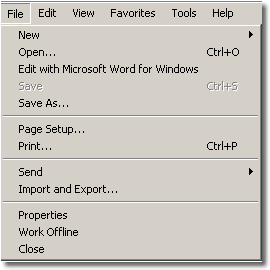
  • New: Opens a new window for the browser, leaving any windows already open intact. It also leads to submenus for sending messages and posting to new groups.

  • Open: Opens a new URL address for the browser.

  • Edit with Microsoft Word for Windows: Opens the web page inside the Microsoft Word program.

  • Save: Saves Changes.

  • Save As: Saves the presently displayed document.

  • Page Setup: Sets up the printer for output.

  • Print: Prints the displayed page.

  • Send: Sends copy of the presently displayed document as an Email page, an Email link or a shortcut icon to your desktop.

  • Import and Export: Allows you to transfer information about you (favorites, etc.) to and from another computer.

  • Properties: Shows information about the displayed page.

  • Work Offline: Allows you to temporarily view Web pages without being connected to the Internet.

  • Close: Closes the browser window.


Next