

Electronic Mail | Sending Electronic Mail


Sending Electronic Mail
Sending email is relatively easy if your Web Browser supports email and has been properly configured. We will assume that to be true in what follows. Many different browser-based email systems are in use. We will give an example that will probably not be exactly the same as yours, but it should be similar.
To send email, go to your browser menu and select "New Mail Message" from the pulldown menu under "File" (see the following figure). This will bring up a mail window of the form shown in the figure below.
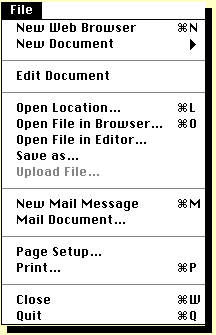
As you can see, in this figure there are several
windows into which you may enter information.
To illustrate what goes into those windows, we are going to
send a mail message to the President of the United States.

Now to send the email message, we do the following in the mail window that you
have opened:
Be sure to put the
address exactly like this. The regular postal service may still deliver mail
if you make a spelling mistake in the address,
but most computers will reject email
if even one character is wrong in the address.
where youraddress is whatever your personal email address is.
("CC:" stands for
"Carbon Copy", from the
old days when people used mechanical typewriters with carbon paper for copies
and rode around in covered wagons!)
Notice that in this case we use commas to separate multiple addresses. Entries
in the "CC:" field are optional (you don't have
to send a copy to anyone), but
you must enter an address in the "Mail To:" field, since it wouldn't make much
sense to send a message without an address for the primary person the message
is for! The distinction between the primary recipients and those receiving a
CC: is for human sensibilities. In either case, the computer sends the email
message to the address listed. The only difference is where the recipients
address will be printed in the mail header when it is read.
That's it! If your computer is set up properly to handle email, and you have
not made a mistake in typing in the addresses, you have just sent an email
message to the President and copied it to the
Vice-President. You have also sent a copy to
yourself, so you should be receiving an email message very shortly from
yourself and, we hope, a reply from the President and Vice-President.
Since it looks like we are going to be receiving some mail,
we now need to learn how to read incoming email messages.
