Tutorial
Welcome to the
webTeacher Tutorial.
Before we begin, we need to do a few things to get our computer
displays set up, and to discuss a couple of suggestions about how to use
this tutorial most effectively.
If You Want a Printed Version
The WWW Tutorial is entirely on-line, but you will probably
find it useful to have a
printed copy. Permission is given to copy any parts that you desire, subject
to the
general usage provisions
of the tutorial.
Some Preliminary Browser Things
(1) Make sure your browser window is wide enough to allow all of the pages to
format properly. Use the mouse to
grab the browser corners and drag the corners horizontally
until
the window is wide enough for everything in the windows to display.
It will also be
useful to make the browser window as large in the vertical direction as your
screen allows.
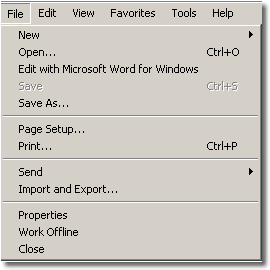 (2) Use the "New Web Browser" option under the "File" menu item (see the
adjacent figure) to create a
second browser window (other than the one you are presently
using). You can hide it, or
place it behind the present browser window for now, but later we will use the
second browser window to try out exercises described in
the tutorial (which will be displayed in this browser window).
(2) Use the "New Web Browser" option under the "File" menu item (see the
adjacent figure) to create a
second browser window (other than the one you are presently
using). You can hide it, or
place it behind the present browser window for now, but later we will use the
second browser window to try out exercises described in
the tutorial (which will be displayed in this browser window).
This tutorial is set up to use the browser formatting scheme known as
frames.
We shall discuss browser navigation
further in the tutorial, but we make several general remarks here to aid in
navigating with frames.
Browser Frames
As you can see, the present browser window is divided into two
sub-windows or
"frames". (The adjacent
figure labels these for clarity.)
Essentially, each frame is an independent browser window, and these
independent browser windows can talk to each other. That gives a lot of
flexibility in formatting and navigation, which is why we are using frames for
this tutorial.

So Let's Get Started!
O.K. Those are the initial things that we needed to take care of. Now we are
ready to begin. The frame to the right of this one contains a scrollable Table
of Contents. You can go to any section of the Tutorial by clicking on the
title for that section in the Table of Contents. The material in the
corresponding section
should then appear in this window.
Let us begin the tutorial by using
your mouse to click the entry "Web Browsers" near the top of the
Table of Contents (use the scroll bar to go to the top
if necessary).